DOM-based XSS occurs when client-side JavaScript directly modifies the Document Object Model (DOM) using unsanitized user input. Unlike stored and reflected XSS, this type doesn’t involve server-side interaction, as the vulnerability exists purely in the client-side code.
Before diving into all the details about how the DOM works, let’s clarify a few concepts.
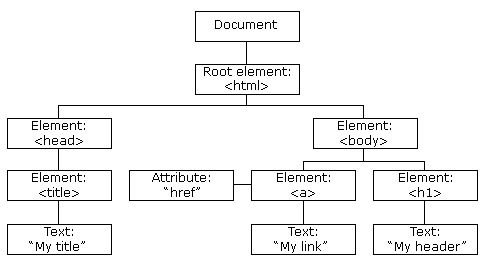
JavaScript HTML DOM
In the diagram above, the DOM is a tree-like structure that represents the HTML document, allowing JavaScript to interact with the page. This method lets developers access and modify elements, like the <body> tag. Once the DOM is created, it's rendered in the browser, enabling dynamic changes to the webpage’s content and layout
JavaScript provides predefined functions to help developers work with the DOM, and these functions generally fall into two types:
Source functions: Used to retrieve or access information from the DOM.
Sink functions: Used to modify or add content to the DOM.
These functions make it easy to create dynamic, interactive web pages by letting developers directly work with the content and structure of the document.
A source function is any JS property or function that accepts user input from somewhere on the page. An example of a source is the location.search property because it reads input from the query string
Here are some common DOM sources:
1document.URL
2document.documentURI
3document.URLUnencoded
4document.baseURI
5location.search
6document.cookie
7document.referrer
These sources provide access to various types of information within the document or the browser environment, such as the URL, cookies, and referrer data.
A sink is any location in an application where data is used or outputted. This is typically where data is rendered in the browser or processed in some way, which could lead to unintended consequences if the data is malicious.
Common DOM sinks include:
1document.write()
2document.writeln()
3document.domain
4element.innerHTML
5element.outerHTML
6element.insertAdjacentHTML
7element.onevent (e.g., element.onclick, element.onmouseover)
These sinks are used to inject or modify content within the DOM. They can alter the HTML structure, add new elements, or set event handlers, allowing developers to create dynamic, interactive web pages.
By now, you should have an understanding of what the DOM is, how it works, and the main types of JavaScript functions used with the DOM. These include sources (which retrieve data) and sinks (which modify data) to create dynamic and interactive web pages.

Here’s a simple example of a DOM-based XSS vulnerability to illustrate how it can occur and how it can be exploited.
Vulnerable Code Example
HTML Page: Consider the following HTML page, which allows users to provide their name via the URL parameter and displays a greeting on the page:
1<!DOCTYPE html>
2<html>
3<head>
4 <title>Welcome Page</title>
5</head>
6<body>
7 <h1>Welcome to Our Website!</h1>
8 <div id="greeting"></div>
9
10 <script>
11
12 const urlParams = new URLSearchParams(window.location.search);
13 const name = urlParams.get('name');
14
15
16 document.getElementById('greeting').innerHTML = `Hello, ${name}!`;
17 </script>
18</body>
19</html>
This is a web page demonstrating the DOM mechanism in a real-life scenario. When a user logs into the page, it dynamically displays a personalized greeting, such as “Hello, Alice.”
To understand how an attacker might exploit this page, let’s look at the demo attack.
1)First, the user accesses the page.
The URL might look like this:
<https://example.com/?name=Alice>
When the page loads, it will render a greeting that says, “Hello, Alice.”
2)The attacker sees a DOM vulnerability here.
An attacker can craft a URL like this:
<https://example.com/?name=><script>alert('XSS');</script>
The attacker sends the crafted link to the victim. When the victim clicks this link, the page will render the injected content using the DOM.innerHTML built-in function in JavaScript. The script will execute, displaying an alert box with "XSS," and the DOM will be modified accordingly.
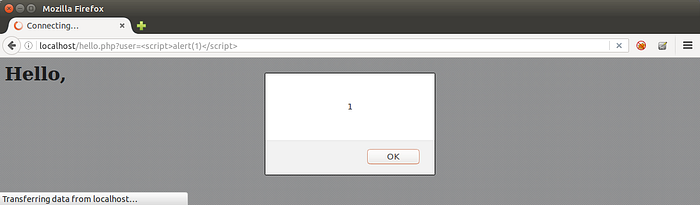
Alert box example
The simple fix is to avoid using innerHTML and instead use safer methods like textContent to handle user input. This ensures that any user-supplied data is treated as plain text rather than HTML, thus preventing the execution of malicious scripts.
IS IT ALL WEB PAGES HAVE A DOM ?
0QxZ_C981-hHrj-Qu
Let’s dive into this topic.
If an HTML body contains any content, or if you attempt to access that content on the web page, it may lead to DOM manipulation or script execution. This occurs when JavaScript interacts with the DOM to dynamically modify the structure or content of the page. Such interactions show that the web page operates through the DOM structure.
Data Theft: Attackers can steal sensitive information, such as cookies and session tokens, which may lead to unauthorized access to user accounts.
Account Hijacking: With stolen session cookies, attackers can impersonate users, gaining access to their accounts and performing actions on their behalf.
Malware Distribution: XSS can be exploited to deliver malware to unsuspecting users, compromising their devices and data.
Loss of User Trust: Frequent XSS vulnerabilities can damage the reputation of a website, leading to a loss of user trust and decreased usage.
Input Validation and Sanitization: Validate and sanitize user input to ensure that only expected data is accepted. Use allow-lists to filter out potentially harmful characters.
Output Encoding: Encode output before rendering it in HTML to ensure that user input is treated as text rather than executable code. This prevents scripts from being executed in the browser.
Implement Content Security Policy (CSP): Use CSP headers to restrict the sources from which scripts can be loaded and executed. This helps prevent the execution of unauthorized scripts.
HTTPOnly and Secure Cookies: Set the HttpOnly and Secure flags on cookies to prevent them from being accessed by JavaScript and ensure they are transmitted securely over HTTPS.
In this post, I’ve shared insights on DOM-based XSS, where attackers inject malicious scripts into a webpage through JavaScript and the DOM. This vulnerability arises when user input is not properly handled, leading to serious security risks.
I’ve highlighted key ways to prevent these attacks, such as input validation, output encoding, and implementing security measures like Content Security Policies (CSP) and secure cookies. Follow me for more updates on web security!